Introduction
Getting paid on time is one of the most stressful aspects of freelancing, and much of this burnout is due to sending unprofessional invoices, lacking clear terms, or making the payment process uncomfortable for the customer. Sector studies indicate that about 85% of freelancers experience delays in paying their bills at some point, and the right tool can significantly reduce the frequency of this problem.
We compared 10 of the most used billing tools for freelancers in 2026, including pricing, customer limits, payment processing fees, and tools that connect directly to time tracking, so you can choose the tool that best suits the way you work, not just the one with the most attractive homepage.
What Actually Matters in an Invoicing Tool
Before we go over the ratings, here’s what sets a really useful billing tool apart from one that just looks attractive: Automated payment reminders and clear terms are more important than the invoice design itself; Maximum customer limits are often more important than monthly subscription fees if you manage more than 10 active customers; In addition, payment processing fees count above the subscription cost; You may end up with a “free” tool – It charges a fee of 2.9% + $0.30 to $0.60 per card payment – making it more expensive than a paid plan with lower payment gateway fees, once you start billing regularly.

The 10 Best Invoicing Tools, Ranked
1-Wave — Best Free Option
Wave offers integrated accounting and invoicing features without any restrictions and without the cost of a monthly subscription, combining bookkeeping, expense tracking, and customer invoicing into one platform. If you send between 2 and 5 invoices per month, these features alone are quite enough.
Price: $0/month. Payment processing fees apply per transaction.
2-Zoho Invoice — Best Free for International Freelancers
Zoho Invoice offers a truly free plan with no subscription costs. It supports issuing up to 500 invoices annually and conducting billing transactions in multiple currencies, with automatic exchange rate updates-an important feature for freelancers working with clients in different countries. In contrast, the free plan charges a maximum of 5 clients, necessitating an upgrade to a paid plan once you start dealing with the sixth client.
Price: $0/month (capped), Premium tier around $15/month once you outgrow the cap.
3-FreshBooks — Best for Professional Automation
FreshBooks is the benchmark against which other billing tools are compared, and is known for its features of sending automated reminders about late payments and applying scheduled late fees. Pricing options range from Lite (about $19-23 per month for 5 billable clients), Plus (about $38-43 per month for 50 clients), and Premium (about $65-70 per month for unlimited clients); for freelancers managing a growing client base, The maximum number of customers included in the package is a more important factor than the advertised price.
Price: From ~$19/month (promotional rates as low as $6.90/month are common).
4-Invoice Ninja — Best for Data Control
Invoice Ninja is the perfect choice for freelancers who pay close attention to privacy or have good technical skills and want complete control over their billing data through an open source, self-hosted solution. The free plan covers 5 customers with the ability to issue an unlimited number of bills, while the “Pro” plan costs $14 per month; However, there was a price increase in January 2026, so it is recommended to check the current price before committing to the service.
Price: Free (5 clients) or $14/month (Pro).
5-PayPal Invoicing — Best for Payment Flexibility
For customers seeking maximum payment flexibility, PayPal Invoicing supports card payment, Venmo, Apple Pay, and buy now, pay later options-useful features if your customers prefer a variety of payment methods, even if the fees are higher than on billing platforms.
Price: No subscription; per-transaction fees apply.
6-Bonsai — Best All-in-One Freelance Management
The Bonsai platform combines invoicing with contracts, proposals, and time tracking, where time data is transmitted directly to be included as items in invoices. Prices range from $15 per user per month (when paying monthly) or $9 per user per month (when paying annually), up to $59 per user per month in the “Elite” package. Note that the 7-day free trial period requires submitting card data in advance.
Price: From $9/month (annual) to $59/month (Elite).
7-HoneyBook — Best for Client Relationship Pipelines
Honeybook manages the entire business cycle —from submitting offers to completing payments — for creative freelancers who want to integrate invoicing into a more comprehensive customer relationship management tool. It’s worth noting that HoneyBook raised its prices significantly in early 2025, so it’s advisable to carefully compare current prices with other alternatives, such as Bonsai, before deciding to subscribe.
Price: Check current pricing directly — rates have shifted meaningfully in the past year.
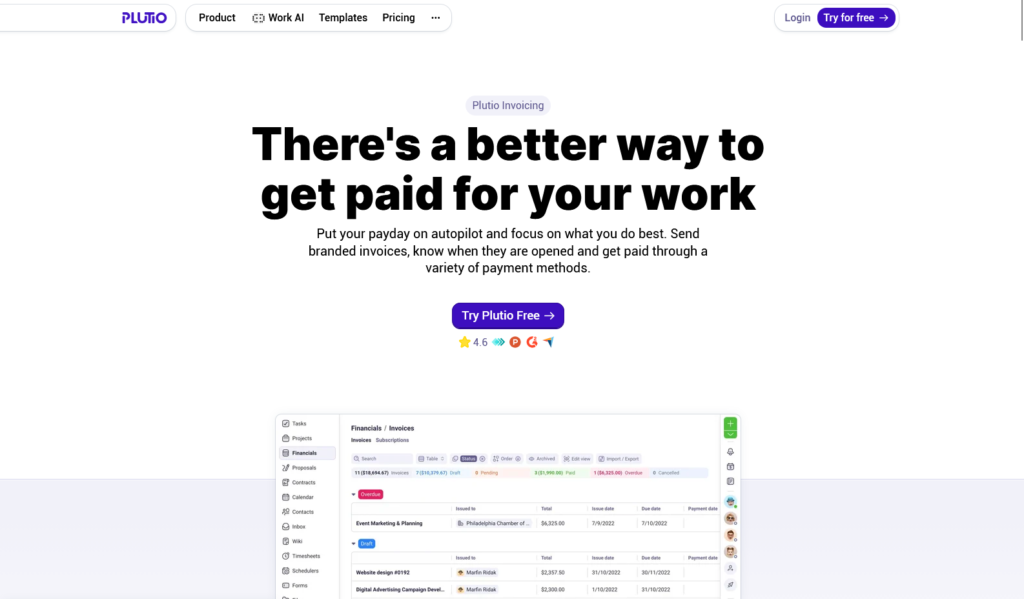
8-Plutio — Best for Time-Tracking-to-Invoice
The Plutio platform links the invoicing process directly to time tracking logs, projects, and customer data; When the project is completed, you can create an invoice that includes items that are automatically derived from the recorded hours, without the need for any manual data transfer steps. In contrast, independent tools that separate time tracking from invoicing often rely on hour estimates and miss opportunities to bill work already completed.
Price: From $19/month.
9-QuickBooks Online — Best for Accounting and Tax Prep
QuickBooks is the perfect choice for freelancers who want direct integration with TurboTax and complete tax preparation as well as invoicing. However, it lacks features for time tracking, offer preparation, contracts, and a customer portal, so freelancers who are paid by the hour or submit offers will likely need separate tools for those specific processes.
Price: Check current tiered pricing on the QuickBooks site.
10-Dubsado — Best for Service-Based Freelancers
Dubsado’s Premier package includes time-tracking billing at a cost of $40 per month, along with customer portals and workflow automation; This makes it an excellent choice for freelancers who provide services and adopt an organized process to prepare new clients.
Price: Premier plan at $40/month.
Comparison Table
| Tool | Free Plan? | Entry Paid Price | Client Cap (Free) | Best For |
| Wave | Yes (unlimited) | N/A | None | Budget-conscious freelancers |
| Zoho Invoice | Yes | ~$15/mo | 5 clients | International/multi-currency billing |
| FreshBooks | No | ~$19/mo | N/A | Automated professional invoicing |
| Invoice Ninja | Yes | $14/mo | 5 clients | Data control, self-hosting |
| PayPal Invoicing | No sub. fee | Per-transaction | N/A | Payment method flexibility |
| Bonsai | No | $9/mo (annual) | N/A | All-in-one freelance management |
| HoneyBook | No | Check current rate | N/A | Creative client pipelines |
| Plutio | No | $19/mo | N/A | Time-tracking-to-invoice automation |
| QuickBooks Online | No | Check current rate | N/A | Accounting & tax prep |
| Dubsado | No | $40/mo (Premier) | N/A | Service-based client workflows |
The Fee Most Freelancers Forget to Check
All billing tools that accept online payments charge a processing fee that is added to the subscription price. Stripe-based tools typically charge a fee of 2.9% + $0.30 per card payment, while ACH transfers cost around 1% on most platforms. For example, for a $3,000 bill paid with a credit card, the processing fee alone may range between $87 and $117 depending on the platform. This is an inevitable cost no matter which tool you choose, but it varies so significantly between platforms that it requires comparing it directly to the cost of a subscription.
How to Choose Based on Your Business
Sending 2-5 invoices a month? Start with a free plan — Wave or Zoho Invoice comfortably covers this volume at zero subscription cost.
Billing hourly across multiple active clients? Take a look at tools that link time tracking directly to invoices; Apps like Plutio, Bonsai, or Dubsado eliminate the manual step of moving recorded hours to invoice items.
Managing 10-30 active clients? Pay closer attention to per-client caps than the sticker price — FreshBooks Lite’s 5-client cap or Zoho’s free-tier cap can force an unexpected upgrade sooner than the monthly price suggests.
Need full accounting and tax prep, not just invoicing? QuickBooks Online remains the strongest pick if TurboTax integration and tax-season prep matter more than time tracking or client portals.
FAQ
What’s the best free invoicing tool for freelancers in 2026?
Wave offers virtually unlimited accounting and invoicing services without any subscription fees, while Zoho Invoice is the most powerful option, specifically for international freelancers who need to invoice in multiple currencies, knowing that its free plan is limited to dealing with 5 clients.
Do invoicing tools charge fees on top of the subscription price?
Yes, almost all tools that process online payments charge a fee per transaction (usually 2.9% + $0.30 for Stripe card payments), regardless of your subscription category.
Which invoicing tool connects time tracking directly to invoices?
Plutio, FreshBooks, Bonsai, and Zoho Invoice all include time tracking features that list their data directly within invoice items. Plutio allows tracked hours to be converted into an invoice with the push of a button and without the need for any manual export step.
Is FreshBooks worth it over free tools like Wave?
FreshBooks justifies its cost once it needs features like automated late payment reminders, scheduled late fees, and more professional customer-oriented invoicing-benefits that Wave’s free package doesn’t offer with the same level of comprehensiveness.
What happens when I exceed a free plan’s client cap?
Most free plans require an upgrade once the customer limit is exceeded; for example, Zoho Invoice places a 5-customer limit for free users, while FreshBooks Lite places a 5-customer limit that is billable before requiring a move to the “Plus” category.
Is HoneyBook still a good option after its recent price increase?
It depends on your budget; HoneyBook raised its prices significantly in early 2025, so it’s worth comparing current prices directly to those of alternatives like Bonsai before committing to a long-term plan.
Final Verdict
There is no single “best” billing tool for all freelancers; The optimal option depends on the size of the invoices you issue, whether you are paid hourly, and the number of active clients you deal with. If you are at the beginning of your career, the free and unlimited billing feature provided by the Wave platform is a very safe starting point. As your customer base expands and workflows become more complex, tools like FreshBooks, Bonsai, or Plutio become a viable investment that justifies the cost of a subscription because they can automate aspects that typically cause late payments, such as sending reminders, converting business hours into invoices, and setting clear payment terms.
Sources
- Plutio, “Best Invoicing Software for Freelancers in 2026 (Compared)”: https://www.plutio.com/freelancer-magazine/best-invoicing-software-for-freelancers
- Jobbers, “Best Invoicing Software for Freelancers 2026 — 12 Tools Tested and Ranked”: https://www.jobbers.io/best-invoicing-software-for-freelancers-2026-12-tools-tested-and-ranked/
- OneSuite, “7 Best Invoicing Software for freelancers (2026)”: https://onesuite.io/blog/invoicing-software-for-freelancers/
- Vecosys, “12 Best Invoicing Software for Freelancers in 2026”: https://www.vecosys.com/best-invoicing-software-freelancers-2026/
- Assembly, “The 8 Best Free and Paid Invoicing Software for Freelancers [2026]”: https://assembly.com/blog/invoicing-software-for-freelancers
- Agiled, “13 Best Invoicing Software for Freelancers (2026)”: https://agiled.app/blog/best-invoicing-software-for-freelancers
- Taskip, “Best Invoicing Software for Freelancers in 2026 (12 Tools Compared)”: https://taskip.net/invoicing-software-for-freelancers/