Table of Contents
Introduction
Between the option to “just have a simple spreadsheet” and the option to “use six different tools to run the team,” ClickUp stands — a project management platform that has spent recent years striving to become the only tool that can do without others. Tasks, documents, whiteboards, chat, goals, time tracking, and now AI, all under one login.
It’s this very ambition that makes ClickUp’s pricing both attractive and confusing. This comprehensive review of the 2026 ClickUp tool covers what users actually get on each plan, the recently redesigned AI pricing structure that has confused many legacy users, and how well the tool can withstand its competitors, Asana and Monday.com
What is ClickUp?
ClickUp is an integrated productivity and project management platform, based on the idea of replacing several separate tools —task tracker, document tool, whiteboard app, and time tracker — with one unified workspace. It organizes work within a hierarchy (workspace ← space ← folder ← list ← task), giving it greater structural depth than simpler tools like Trello, with a steeper learning curve.
In 2026, ClickUp continues to position itself as the “one-stop app” for modern work, directly competing with Asana, Monday.com, and even Notion for teams looking to reduce their subscriptions and rely on a single central source of information.
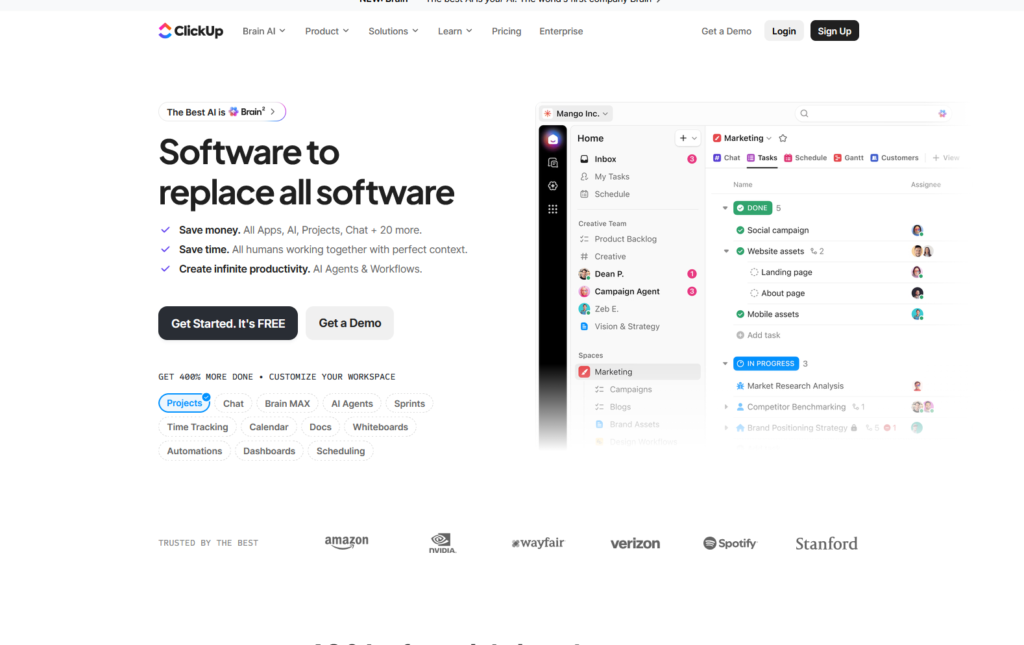
Key Features
Task management and views
ClickUp supports more than fifteen different ways to display the same data —list, panel (Kanban), Gantt chart, calendar, timeline, etc.— so that each team member can look at the same data in the format that best suits them. Tasks support custom states, priorities, dependencies, and nested subtasks.
Documents and whiteboards
Docs’ built-in tool allows you to write specifications, standard procedures, or meeting notes directly related to tasks, while whiteboards provide a visual brainstorming space capable of turning sticky notes directly into trackable tasks — a feature that’s actually useful for teams that plan visually before implementation.
Automation
ClickUp includes rules-based automation (if this happens, do this) with generous limits even on average plans; The Business plan alone includes up to ten thousand automation rules per month, covering the needs of most small and medium teams without hitting the usage ceiling.
Track time and reports
Built-in time tracking, workload displays, and race reports (Sprints) are built into the tool itself rather than requiring a separate application— which saves a real cost for someone who would otherwise pay for a standalone time tracking tool like Toggl or Harvest along with project management software.
Integrations
ClickUp connects to over a thousand tools, including Slack, Google Drive, Dropbox, and Zapier, allowing it to integrate into a user’s existing toolkit rather than forcing a complete replacement from day one.
ClickUp Prices in 2026
ClickUp adopts a monthly pricing model for each seat, across five master plans. Advertised prices haven’t changed much in 2026, but the structure of the AI add-on has changed significantly (details below).
| Plan | Price (Annual) | Price (Monthly) | Best For |
|---|---|---|---|
| Free Forever | $0 | $0 | Individuals, freelancers, tiny teams |
| Unlimited | $7/user/mo | $10/user/mo | Small teams outgrowing free limits |
| Business | $12/user/mo | $19/user/mo | Growing teams needing automation & reporting |
| Business Plus | ~$19/user/mo | Higher (monthly) | Teams needing custom permissions & priority support |
| Enterprise | Custom | Custom | Large organizations needing security & compliance |
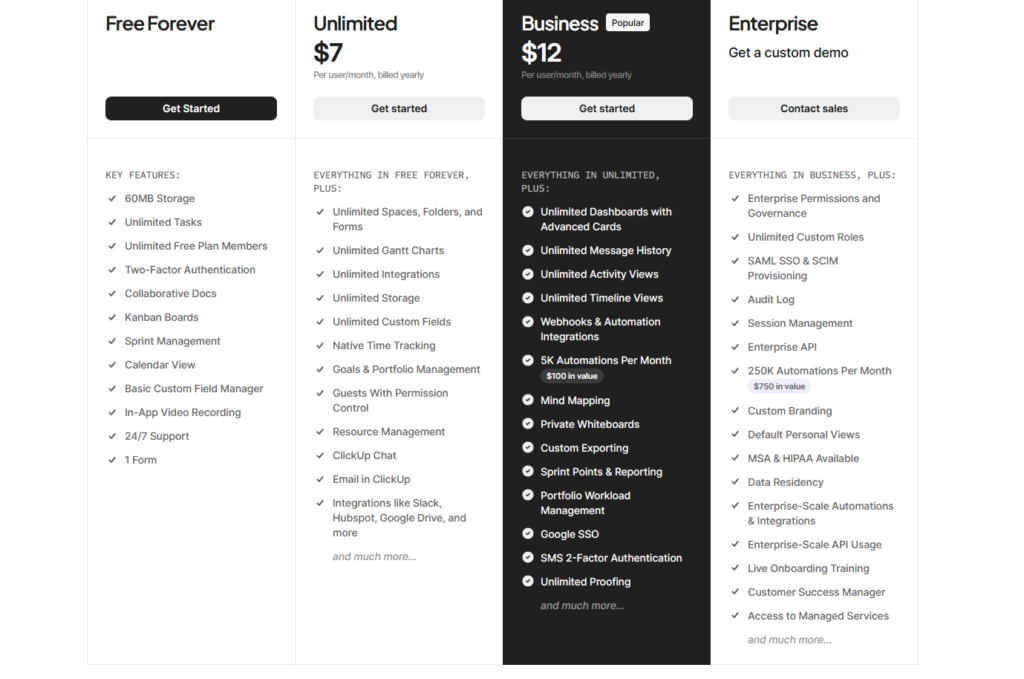
The perpetual free plan is really generous for its zero cost: unlimited tasks, unlimited users, collaborative documents, whiteboards, instant chat, and Kanban boards, with no fee per seat. However, the drawback lies in the storage space ceiling (about 100 MB) and the strict limits imposed on the number of whiteboards, dashboards, and mind maps —which does not represent a problem for individual use, but it becomes restrictive as the team expands.
New AI Pricing Structure (ClickUp Brain)
This is a detail that will surprise many users in 2026, and is worth understanding well before seriously planning your subscription budget. The fixed AI add-on at $7 per user per month no longer exists; ClickUp’s AI is now known as ClickUp Brain, divided into two levels added on top of any paid plan:
Brain AI: $9 per user per month — Includes smart assistant, AI chat (with access to Claude, ChatGPT, and Gemini forms), typing assistance, and enterprise search.
Everything AI: Twenty-eight dollars per user per month — Adds the full suite of automated agents, an AI meeting note taker, and unlimited AI fields and automation.
In addition to the fixed seat fee, heavier-to-use features (such as advanced agents, AI automation, and image generation) pull from a separate balance known as ClickUp Super Balances (Super Credits), at a price of approximately $0.001 per balance, or about ten dollars for every ten thousand balances —which means that users who use AI extensively may see a rise in their bill that is difficult to predict compared to a fixed monthly fee.
As a concrete example: A twenty-seat team on a Business plan adding Brain AI would only pay $12 + 9 = $21 per user per month, or $420 per month in total, before any consumption of Super Credits is counted. This is a significant jump from the base price of the Business plan, and is worth taking into account before assuming that the AI feature is just a minor addition.
Pros and cons
pros
- Really generous permanent free plan — unlimited tasks and users for zero dollars
- More than fifteen views cover most project management techniques within a single tool
- Built-in time tracking and racing reports replace separate tools
- Generous automation limits even on an average Business plan (ten thousand rules per month)
- Value-for-price rating above average (4.4 out of 5) according to independent buyer research
- Better automation limits than Monday.com when compared to close prices, according to independent transaction data
cons
- The restructuring of AI pricing has made it a balance-based system, more complex and difficult to predict
- The breadth of features creates a steep learning curve for new teams
- The storage space cap and whiteboard and dashboard limits in the free plan quickly become restrictive as the team grows
- Enterprise plan pricing requires direct communication with the sales team, without a pre-announced price for planning
- Hidden costs may add 10 to 30 percent to the base price through additions such as premium support and advanced permissions
| Feature | ClickUp | Asana | Monday.com |
|---|---|---|---|
| Free Plan | Unlimited tasks & users | Limited to 10 users | Limited to 2 users (basic) |
| Entry Paid Price | $7/user/mo | Higher list pricing | Comparable to ClickUp |
| Automation Limits | High (10,000 rules on Business) | Moderate | Lower at comparable price points |
| Native Time Tracking | Yes, built in | Requires integration | Requires integration |
| Learning Curve | Steep (most feature-dense) | Moderate | Gentle (most visual) |
According to independent transaction data, ClickUp buyers with automation-intensive workflows tend to achieve better total cost results compared to equivalent Monday.com plans, while Asana’s advertised prices are significantly higher than its ClickUp counterpart at close levels— although both Asana and Monday.com provide a smoother learning curve for teams that find the depth of ClickUp stressful.
Who is this tool suitable for, and who should avoid it?
ClickUp fits who it is:
- An independent or small team that wants a truly powerful tool before paying any amount
- A growing business that wants to integrate task and document management and time tracking into one subscription
- A complex workflow team that benefits from deep automation and multi-viewing
Who should avoid it: teams who want a simple, visual tool ready for immediate use (Monday.com may be more suitable), or who plan to rely heavily on AI features without careful financial planning; A balance-based pricing system can grow more unpredictable than a fixed monthly fee.
FAQ
Is ClickUp worth it in 2026?
Yes, this is true for most small and medium teams. The Free Forever plan alone provides the ability to add an unlimited number of tasks and users, and the automation and reporting features in the Business category offer excellent value for cost compared to competitors who offer their services at similar prices.
How much does ClickUp cost per user?
Prices range from $0 (the perpetual free plan) to $7 per user per month (the Unlimited plan, at annual payout) up to $12 per user per month (the Business plan, at annual payout), with Business Plus and Enterprise plans above that, plus optional AI add-ons starting at $9 per user per month.
Is ClickUp AI included in the base subscription?
No, ClickUp Brain is a separate add-on. Brain AI costs $9 per user per month, and Everything AI costs $28 per user per month, added on top of the base plan price, with heavier usage drawn from a separate balance known as Super Credits.
What’s the biggest limitation of ClickUp’s free plan?
Storage space is limited to about 100MB, and whiteboards, dashboards, and mind maps are subject to strict limits— which is suitable for single use, but becomes restricted once the team expands, even with a small number of individuals.
Is ClickUp better than Asana or Monday.com?
It depends on priorities; ClickUp generally offers generous automation limits and a stronger free plan, while Monday.com has a smoother learning curve, and Asana fits teams that are pre-linked to its system— and balancing price and complexity tends to favor ClickUp specifically for small, automation-intensive teams.
Does ClickUp have hidden costs beyond the listed plan price?
Yes; Add-ons like premium support, extra storage space, and advanced permissions can add 10 to 30 percent to the basic subscription cost, and multi-year contracts often open up additional discounts worth negotiating.
Final Verdict
ClickUp remains one of the most powerful comprehensive project management platforms in 2026, especially for small teams and freelancers looking for serious jobs without an immediate subscription cost. The perpetual free plan alone is more generous than most competitors’ basic paid plans. The only caveat worth noting for 2026 is the AI pricing restructuring; ClickUp Brain’s balance-based system can make a bill less predictable than a fixed additional fee, so it’s a good idea to plan carefully if AI features are a deciding factor in your upgrade decision.
Sources
- ClickUp official pricing page: https://clickup.com/pricing
- Capterra, “ClickUp Pricing 2026”: https://www.capterra.com/p/158833/ClickUp/pricing/
- Vendr, “ClickUp Software Pricing & Plans 2026”: https://www.vendr.com/marketplace/clickup
- SmartSuite, “ClickUp Pricing: Is It Worth It in 2026?”: https://www.smartsuite.com/blog/clickup-pricing
- eesel AI, “ClickUp pricing 2026: Plans, costs, and free tier”: https://www.eesel.ai/blog/clickup-pricing
- SaaSworthy, “ClickUp Pricing Plans & Features (2026)”: https://www.saasworthy.com/blog/clickup-pricing-plans-features
- UpSys Consulting, “ClickUp Pricing 2026: All Plans Compared”: https://www.upsys-consulting.com/en/blog/clickup-pricing-explained
- Layer3 Labs, “ClickUp Pricing 2026: Full Plan Breakdown + Is It Worth It?”: https://www.layer3labs.io/guides/clickup-pricing
also read
the last post https://bestimoz.com/zap/