table of content
Introduction
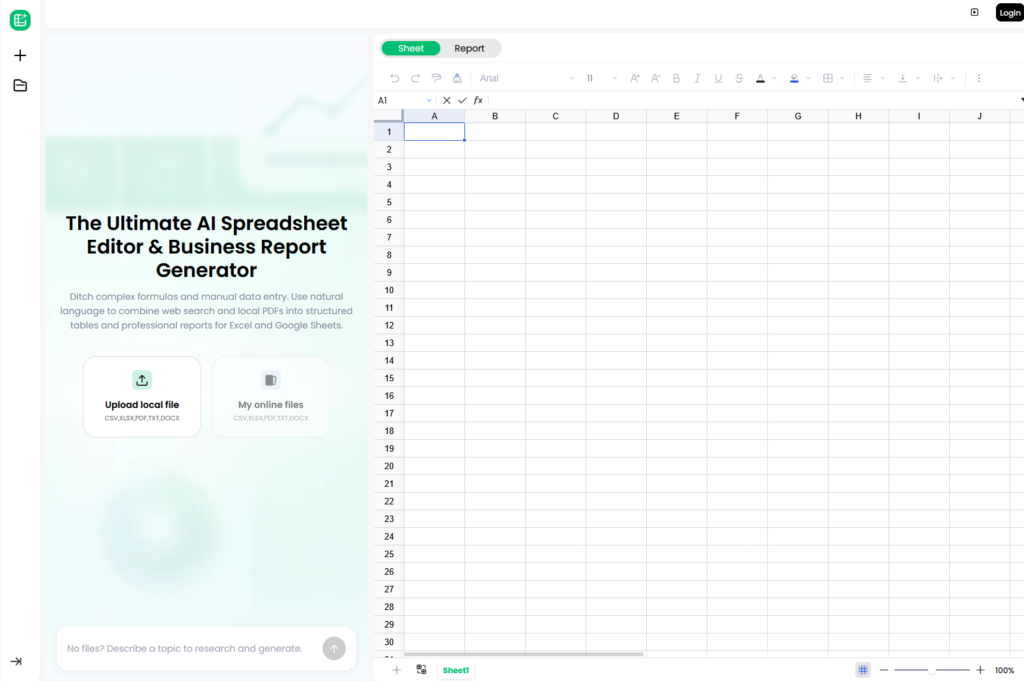
If you’ve ever spent an afternoon manually transferring numbers from a set of PDF invoices to a spreadsheet, you’re acutely aware of the problem PopAi Sheets promises to solve. It’s an AI-powered spreadsheet editing tool designed to integrate with both Microsoft Excel and Google Sheets, promising to transform unstructured PDF files, receipts, and web data into organized, organized tables with just simple, straightforward English instructions.
In this 2026 PopAi Sheets review, we detail the tool’s functionality, compare its pricing to competing AI-powered spreadsheet tools and software, and discuss whether it’s worth adding to your practical toolkit, especially if you’re self-employed, a data analyst, or a small business owner facing the burden of manual data entry.
What Is PopAi Sheets?
PopAi Sheets is an AI-powered spreadsheet tool developed as part of PopAi’s comprehensive smart workspace platform, designed specifically to serve as a smart tool for creating Excel equations and converting documents into spreadsheets. Instead of manually building equations or rewriting data from the original documents, simply describe what you need in natural language —such as: “Extract third-quarter financial statements from these three PDF files, create a comparison table, and write a summary report” — so that the tool can handle the tasks of extracting, organizing, and writing equations automatically.
The tool revolves around three main advantages: converting unstructured documents into structured tables, translating regular language (English) into complex Excel or Google Sheets equations, and creating professional, curated business reports based on the resulting data.
Key Features
PDF and Document Data Extraction
This is the most prominent feature of PopAi Sheets; You can upload PDF files, receipts, invoices, or even unstructured CSV files, and the AI automatically extracts relevant data — such as list items, totals, dates, and product codes (SKUs) — and arranges them in an organized and clean spreadsheet, without having to manually re-enter the data.
Natural Language Formula Generation
Instead of remembering the exact formulas used in Excel or Google Sheets, you can write a request in simple English — such as “Calculate Monthly Liquidity Consumption Rate” (monthly burn rate) — and PopAi will convert it to the correct formula, a pivot table (Pivot Table), or a database to format the data; This acts as a “chatbot” specialized in formulating Excel equations.
Real-Time Web Search Integration
Besides local files, PopAi spreadsheets (PopAi Sheets) allow you to fetch data directly from the web and integrate it into the spreadsheet; This is a useful feature for tasks like tracking competitors’ prices without having to manually search or copy and paste results.
“Hallucination-Free” Data Verification
PopAi markets this feature as its core advantage over generic AI-powered chat tools: every line and metric extracted is verified against your uploaded source documents or live web data, rather than the AI simply generating numbers that look plausible. Therefore, it is best to test the accuracy of this verification in all cases on your important documents before relying on it in preparing financial reports.
AI Business Report Generation
Once your data is organized, PopAi Sheets can craft it into a written work report; a useful feature for turning raw spreadsheets into a ready-to-present format for stakeholders, without the need for a separate writing step.
PopAi Sheets Pricing in 2026
PopAi Sheets adopts the same subscription structure as the broader PopAi platform for AI-powered work, following the “Freemium” model that gives new users trial credits before moving on to a paid plan.
| Plan | Price | What You Get |
| Free | $0 | Limited usage, basic features, trial credits for new users |
| Pro | ~$10/month | Expanded usage limits, full access to core features |
| Unlimited | ~$40/month | Unlimited usage, advanced features |
| Teams | Custom | Bulk account pricing for businesses |
Pricing and credit allocations can shift as PopAi updates its packaging, so it’s worth checking the live pricing page before subscribing to confirm current rates and whether Sheets-specific features require a separate add-on from the base plan.
If you want to test the extraction features yourself, try PopAi Sheets here: https://sheetspopaipro.sjv.io/L0rmJa
Pros and Cons
Pros:
- It is actually useful for extracting data in large quantities from PDF files and invoices, which is a cumbersome and time-consuming task when performed manually.
- It allows equations to be created using natural language, making spreadsheets easier to use for non-technically specialized users.
- It works with both Excel and Google Sheets, without restricting you to using just one platform.
- It provides integration with live web search, adding search capabilities that most spreadsheet AI tools don’t offer.
- It gives you free trial credit to try out the basic features before signing up or paying.
Cons:
- It doesn’t support real-time collaboration or coworking spaces, which is a clear drawback for teams working together.
- Google Sheets’ service pricing and credit system (Credits) are not as clear or published with the same transparency as competitors like Excel Copilot.
- Although the tool claims to be free of errors caused by artificial intelligence (Hallucinations), it is always best to review the results manually, especially when dealing with financial data or sensitive information.
- It faces stiff competition from tools backed by major companies, such as Microsoft Copilot and Google Gemini built into Google Sheets.
- The testimonials (Testimonials) displayed on the product page do not include verified identities or verifiable links, so it is recommended to treat marketing claims with caution until you have tried the tool yourself.
PopAi Sheets vs the Competition
The AI spreadsheet tools category got crowded fast in 2026, so here’s how PopAi Sheets stacks up against the main alternatives:
| Tool | Entry Price | Strength | Weakness |
| PopAi Sheets | ~$10/mo (Pro) | Strong PDF/document extraction, cross-platform | No team collaboration features |
| Microsoft Copilot in Excel | ~$30/user/mo (+M365) | Handles millions of rows, deep Excel-native integration | Requires Microsoft 365 subscription, premium pricing |
| Google Sheets + Gemini | Free / included in Workspace | Zero extra cost for Workspace users, no install needed | Weaker with native XLSX workflows |
| Rows.com | Free / $59+/workspace/mo | Clean interface, strong direct integrations | Per-user pricing adds up for larger teams |
| Numerous.ai / Formula Bot | Add-on pricing varies | Lightweight formula-focused add-ons | Narrower feature set than full platforms |
The most important conclusion: If your primary problem is extracting data from PDF files and unstructured documents, PopAi Sheets is distinguished by its design that focuses on extracting data first, which gives it a real advantage compared to general tools such as Gemini or Copilot, which excel at analyzing data within spreadsheets, but they are not as efficient when it comes to absorbing and extracting data from documents.
Who Should Use PopAi Sheets?
PopAi Sheets makes the most sense if you’re:
- Freelancers or small business owners who constantly handle invoices, receipts, or customer files in PDF format and want to convert them into spreadsheets quickly.
- People who use Excel and want to create equations and get help without having to memorize or learn complex formulas.
- Researchers and analysts who need to combine data extracted from the web directly with documents they upload within a single spreadsheet.
Who should look elsewhere: teams needing real-time collaborative spreadsheet editing, or enterprise users already paying for Microsoft 365 who may find Copilot’s native integration more seamless despite the higher cost.
FAQ
What is PopAi Sheets used for?
PopAi Sheets is an AI-powered spreadsheet editor that extracts data from PDF files, receipts, and web sources and converts it into structured tables. It can also automatically generate Excel and Google Sheets formats from natural language commands, as well as generate AI-powered business reports based on the data in the table.
How much does PopAi Sheets cost?
PopAi Sheets follows the Freemium pricing model, providing:
Free plan with limited use and trial credit to try out the basic features.
Pro plan is priced at around $10 per month.
Unlimited plan is priced at around $40 per month.
Customized plans for teams (Teams), the price of which is determined according to the needs and number of users
Does PopAi Sheets work with both Excel and Google Sheets?
Yes. The tool is designed to organize, clean, and export data to work on both Excel and Google Sheets, so you won’t be limited to using just one spreadsheet platform.
Is PopAi Sheets’ data extraction actually accurate?
PopAi markets its tool as “100% hallucination-free”, relying on verifying extracted data by comparing it with original documents or direct web search results. However, as with any AI-based tool, it is always advisable to manually review the results, especially when dealing with financial data or sensitive information, before relying on them completely.
How does PopAi Sheets compare to Microsoft Copilot in Excel?
Microsoft Copilot provides deeper integration with Excel and handles very large datasets efficiently, but it requires a subscription to Microsoft 365 and costs about $30 per user per month, which is much higher. In contrast, PopAi Sheets is a more economical option, and is particularly superior at extracting data from documents and converting it into spreadsheets.
Can teams collaborate on PopAi Sheets in real time?
No.This is one of the most notable limitations of PopAi Sheets compared to some competitors, as it currently does not support Real-Time Collaboration (Real-Time Collaboration) or Shared Workspaces (Shared Workspaces) features, making it less suitable for teams that need to work together on spreadsheets.
Final Verdict
PopAi Sheets gains its place in the category of cluttered AI spreadsheet tools with one specific power: converting messy PDF files and documents into structured data with minimal manual effort. For freelancers and small business owners who regularly process invoices, receipts or reports, this alone can justify the modest price for the professional level. It’s not well-suited for teams that need real-time collaboration, and Sheets’ pricing transparency lags behind more established competitors in particular— so thoroughly test your free trial credits before committing to a paid plan.
Sources
- PopAi Sheets official product page: https://sheets.popai.pro/
- PopAi official pricing page: https://www.popai.pro/en/pricing
- SEOFAI, “Pop AI Reviews 2026: Details, Pricing & Alternatives”: https://seofai.com/tool/pop-ai/
- Toolworthy, “12 Best AI Spreadsheet Tools 2026 (Tested & Compared)”: https://www.toolworthy.ai/blog/best-ai-spreadsheet-tools
- Toolradar, “Best AI Spreadsheet Tools 2026: AI-Powered Data Analysis”: https://toolradar.com/guides/best-ai-spreadsheet-tools
- Querri, “Best AI Spreadsheet Tools 2026 | Excel & Sheets Alternatives Compared”: https://querri.com/blog/best-ai-spreadsheet-tools/
Also read: https://bestimoz.com/10-essential-saas-tools-every-small-business-needs/